Introduction
Today, video platforms deliver video to viewers over QUIC and WebTransport, run neural networks on Edge devices and decode streams in the browser with WebCodecs. Yet at the very first step of the video’s journey, where a frame leaves the camera for the first time, many systems still rely on RTSP, a protocol created back in the last century.
RTSP (Real-Time Streaming Protocol) is described in RFC 2326, published in April 1998. That predates Google (founded in September 1998) and YouTube (2005). The vast majority of IP cameras and video recorders can serve video over RTSP, often alongside other methods (ONVIF, HTTP streams, vendor cloud protocols). For the specific task of “pulling a stream from a device”, no universal replacement is in sight. That is why understanding RTSP remains a basic skill for a video engineer.
In this article I will go through the architectural decisions of RTSP, the reasons for its longevity, and the practical problems of integrating with real hardware.
On accuracy. Everything that concerns standards (RFC, ONVIF) I checked against primary sources and provide links. Anything about the behavior of specific cameras most often rests on forums and mailing lists rather than vendor documentation. I mark such places as ⚠ verify: they are worth reproducing on your model and firmware before you rely on them in code.
Why RTSP was created
The chaos of streaming video in the 1990s
Mass streaming audio on the internet began with RealAudio, released in April 1995. Other platforms were developing alongside it. According to an overview of the industry’s history, Vivo, Xing, VDOnet, VXtreme and Microsoft were working on their own solutions (Streaming Media Blog). There was no single standard: each vendor had its own client, server and format:
- RealNetworks (Progressive Networks until 1997) started with its own protocol, PNA. Later, Real’s products used RTSP for control and their own data transfer format, RDT. I found mentions of RDT only in secondary sources, so ⚠ verify.
- Microsoft released NetShow and the MMS (Microsoft Media Server) protocol. Later, Windows Media Server 9 gained RTSP support (AppleInsider, 2009).
- Apple released QuickTime 4 and QuickTime Streaming Server with “real” RTSP in 1999 (same source).
- Vivo, Xing, VDOnet offered their own platforms.
A player from one vendor, as a rule, did not work with another vendor’s server. Server software was tied to a particular ecosystem.
Why HTTP was not suitable
RFC 2326 itself lists how RTSP differs from HTTP/1.1, which it resembles syntactically (RFC 2326, §1.1): an RTSP server almost always needs to maintain state; requests can be sent by both the client and the server; data is carried outside the main connection, by a different protocol. This gives practical reasons why a plain GET was not enough for a stream:
- State. A streaming session has a lifecycle: the client connected, set up the transport, started playback, paused, disconnected. HTTP/1.x does not keep state between requests.
- Playback control. The HTTP semantics have no
PLAY,PAUSE,TEARDOWNoperations and no time-based positioning (in RTSP this is theRangeheader). - Multicast. In the 1990s, IP multicast was actively used for broadcasting: one copy of a stream per network rather than per client. RTSP can announce a multicast group in
SETUP, whereas HTTP does not work with it. - Transport. Media is delivered by a separate protocol (RTP) over UDP, TCP or multicast. HTTP/1.x is rigidly tied to TCP. (Now there is HTTP/3 over QUIC, but by then established approaches to streaming were already different.)
The creation of RTSP
RFC 2326 was written by three authors: Henning Schulzrinne (Columbia University), A. Rao (Netscape) and Robert Lanphier (RealNetworks) — as stated in the document header (RFC 2326). The participation of Netscape and RealNetworks is consistent with industry history: according to AppleInsider, Real collaborated with Netscape on what became RTSP. Schulzrinne is also a co-author of RTP and SIP. The goal of the protocol was a universal “network remote control” (the RFC literally says network remote control) for media servers.
Four decisions were built into the protocol that largely explain its long life:
- Separation of control and data. RTSP is responsible for the session, while media travels over RTP (RFC 1889, January 1996; now RFC 3550 is in force). RTSP does not know what exactly is in the packets: the codec is described in SDP and in the payload format specification (RFC 6184 for H.264, RFC 7798 for H.265). That is why the same RTSP survived codec changes.
- HTTP syntax. The same text-based methods, headers and response codes. For implementers this made life easier: much could be reused.
- Session state. The server associates a client with a session through the
Sessionheader. The states areInit,Ready,Playing(andRecording). Hence the analogy with a video cassette recorder. - Transport independence. In a single
SETUP, the client and server agree on how to deliver data: RTP over UDP (unicast), over TCP inside the RTSP connection (interleaved), or multicast.
Then came RTSP 2.0 (RFC 7826, December 2016). It replaces RFC 2326 but, as the document itself states, is not compatible with 1.0, apart from the version negotiation mechanism (RFC 7826, Appendix I). Among the changes: RECORD and ANNOUNCE were removed, RTSP over UDP was removed, and support for IPv6, request pipelining (Pipelined-Requests), the asynchronous PLAY_NOTIFY, and the rtsps scheme for RTSP over TLS were added.
In practice 1.0 remained the main version. Why this happened is not documented. Here are the reasons that look plausible (these are my conclusions, not quotes from primary sources):
- Incompatibility. A new client could not simply “talk” to an old camera, and old NVRs would not understand new cameras. For millions of already installed devices this barrier is high.
- Libraries. In 2016, Live555 author Ross Finlayson wrote on the mailing list that SRTP for RTSP is defined only for RTSP 2.0, “which almost nobody, including us, implements” (live-devel, May 2016). A fresh example: the new GStreamer element
rtspsrc2lists “RTSP 1.0 support” among its features (GStreamer documentation). - ONVIF. The consortium was founded in 2008, long before RFC 7826. ONVIF does not replace RTSP: its streaming specification is built directly on RFC 2326 and describes RTSP/RTP extensions (ONVIF Streaming Spec 19.06). But the fact that ONVIF describes device discovery, profiles, control and the stream through the already existing RTSP reduced the need for a new protocol. More about ONVIF is in a separate article.
What about encryption? The rtsps scheme is formally defined in RTSP 2.0 (RFC 7826, §22.14.2). In the world of RTSP 1.0, vendors’ ways of protecting the channel differ, and I would not reduce them to a single “de facto standard”. For example, the ONVIF Media2 specification provides for RTSPS and SRTP (this follows from the Media2 WSDL and the ONVIF Core specification), while the Live555 author wrote around 2014 that the library does not support RTSP over SSL (live-devel; the situation may have changed since). Support in a specific camera and a specific client must be checked separately — ⚠ verify.
Reasons for RTSP’s longevity
RTSP’s long life is explained by several factors:
- A huge installed base. There are no exact statistics for RTSP specifically. For scale: IHS Markit estimated that by 2021 more than 1 billion surveillance cameras would be installed worldwide (Security Today, 2019). Those are not only IP cameras, and not all of them serve RTSP. But the order of magnitude is clear: nobody is going to rewrite firmware for the sake of a new protocol.
- Sufficiency for the main task. For “pull a stream from a camera and hand it to a video server inside a local network”, RTSP works well, and its weak points (NAT, operation over the open internet) do not get in the way here. A camera does not have to distribute video to many viewers: its job is to deliver the stream to the video server (VMS), and scaling and encryption for the internet are handled by the server. This is my architectural judgment, not a requirement of the standard.
- Network effect. RTSP is supported by the FFmpeg and GStreamer libraries and by many VMS and NVR products, and the ONVIF specifications are built on it. Relays such as go2rtc (used, for example, by Frigate) also accept RTSP. The cost of moving the whole industry to another protocol is today higher than the benefit.
Over the last 15 years the industry has mostly developed protocols for delivering video from a server to a viewer:
| Protocol | Year | Stated goal | Specifics and limitations |
|---|---|---|---|
| HLS | 2009 (RFC 8216 — 2017) | Streaming through ordinary HTTP servers | Apple recommends 6-second segments, and per the specification the player holds back from the “live edge” by at least three segment durations. Typical latency is tens of seconds. |
| MPEG-DASH | 2012 (ISO/IEC 23009-1) | Adaptive streaming via manifests | The same “segments plus manifest” idea as HLS; not an extension of HLS but a standalone standard. |
| WebRTC | 2011 (first release), 2021 (W3C Recommendation) | Real-time communication between browsers | Latency is usually a fraction of a second (depends on the network and settings). Requires a signaling server. |
| LL-HLS | 2019 (announced at WWDC19) | Low-latency HLS | The target latency is 1–2 s; support for partial segments is needed on the CDN and origin side. |
| SRT | 2017 (open source from Haivision) | Reliable delivery over UDP on unstable networks | Often used to carry video between studios and venues. |
| WHIP | 2025 (RFC 9725) | HTTP signaling for sending video into WebRTC | The standard way to “publish” a stream to a server over WebRTC. |
| MoQ | In development (IETF) | Pub/Sub delivery over QUIC and WebTransport | As of 2026-10-01 it is an Internet-Draft draft-ietf-moq-transport-22, status “WG Document”, not a standard. |
Sources for the table: Apple WWDC19, HLS and DASH timeline, Wikipedia: WebRTC, Wikipedia: SRT, datatracker: MoQ Transport, RFC 9725 (per an overview).
Strictly speaking, none of these protocols is geared toward primary capture of a stream from the camera device itself, the way RTSP is. But it cannot be said that ingest is the exclusive territory of RTSP: SRT and WebRTC (through WHIP) are used to feed streams into broadcast and cloud systems. It is just that support for them in IP cameras is still rare, while RTSP is almost everywhere.
RTSP should not be seen as legacy that is bound to be replaced. It is an infrastructure layer with clear boundaries. If a cloud scenario requires something else, the camera is usually connected through a relay or an Edge node.
RTSP structure: signaling, not transport
RTSP does not carry video by itself. It is a media session control protocol (signaling). Media transfer is the job of RTP (Real-time Transport Protocol), and statistics and synchronization are the job of RTCP (RTP Control Protocol). In the article about RTP I explain how that layer works.
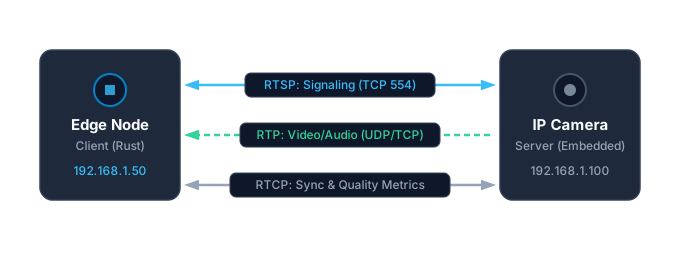
An analogy: RTSP is a TV remote. The buttons are “turn on” (PLAY), “switch track” (SETUP for another trackID), “turn off” (TEARDOWN). The picture itself arrives over the “HDMI cable” (RTP), not over the remote’s infrared beam. The analogy is inaccurate in one respect: in interleaved mode, the “cable” and the “remote” use the same TCP channel.
RTSP is syntactically similar to HTTP: text methods, headers, response codes. The fundamental difference is that an RTSP server has session state (Init → Ready → Playing) and remembers it for each client (RFC 2326, §1.7 and Appendix A).
The handshake: at least four steps before the first frame
A classic RTSP connection to a camera is a sequence of requests where each next one relies on the answer to the previous: OPTIONS, DESCRIBE, SETUP, PLAY. But “four” is more of a lower bound than a hard rule:
OPTIONSis optional in the standard: it can be sent at any moment to learn the supported methods (RFC 2326, §10.1). Many clients still do it first.SETUPis performed for each track separately: video and audio are two requests.- If the camera requires authentication, the first request without credentials will return
401 Unauthorizedwith the authentication parameters, and the client will repeat it. That is another round. - Before the first request, a TCP connection must be established (one more RTT).
The chain cannot be run fully in parallel: SETUP usually needs the SDP from the DESCRIBE response (it contains the track addresses), and PLAY needs the Session that the SETUP response provides. But the standard does not forbid pipelining independent requests in one TCP connection: responses come back in the same order (RFC 2326, §9.1). In RTSP 2.0, a Pipelined-Requests header was added for a fast start, so that several SETUP requests can be sent in a row even before a Session exists (RFC 7826, §18.33).
For 1998 such a scheme was logical. For modern latency requirements it creates its own peculiarities:
- Every request is a round trip. Round-trip time (RTT) is the time for a packet to reach the camera and return with a response. Counting: TCP connection (1) +
OPTIONS(1) +DESCRIBE(1) + twoSETUP(2) +PLAY(1) = 6 RTT, and with an authentication request — 7. At a 100 ms ping, “negotiation” takes 0.6–0.7 s before the camera even starts sending RTP. IfOPTIONSis skipped, it comes to 5 RTT. This is arithmetic for a “clean” scenario; TLS, redirects and a slow camera will add their own. - Text traffic. Messages are human-readable and are logged without special tools. But they are small, and latency is determined not by their size but by the number of RTTs.
- Multiple streams. In the classic variant, commands go over TCP, video over UDP (RTP), metrics over UDP (RTCP). You have to watch several ports at once. In interleaved mode all of this travels over one TCP connection.
The command sequence to the first frame
1. OPTIONS: “Show me the menu”
The request shows which methods the camera supports.
Client request:
OPTIONS rtsp://192.168.1.100:554/stream1 RTSP/1.0
CSeq: 1
User-Agent: MyVSaaS/1.0
Camera response:
RTSP/1.0 200 OK
CSeq: 1
Public: OPTIONS, DESCRIBE, SETUP, TEARDOWN, PLAY, PAUSE, GET_PARAMETER, SET_PARAMETER
Why this is needed:
- Find out what the camera can do. Especially useful for choosing the keep-alive method: the presence of
GET_PARAMETERinPublicis a direct signal that it can be used. FFmpeg does exactly this (see the keep-alive section). - Compatibility. There are reports that some cameras misbehave if
OPTIONSis skipped. I found no confirming documents, so ⚠ verify on your model. SET_PARAMETER. In RTSP 2.0 a server is required to support it, and it is recommended for keep-alive (RFC 7826, §10.5). In RTSP 1.0 it is an optional method, and what exactly can be changed through it depends on the vendor.
2. DESCRIBE: “What can you stream?”
The client requests the media stream’s “passport”. The response arrives as SDP (Session Description Protocol).
Client request:
DESCRIBE rtsp://192.168.1.100:554/stream1 RTSP/1.0
CSeq: 2
Accept: application/sdp
If the camera requires authentication, a 401 Unauthorized with a WWW-Authenticate header will come first (for example, Digest realm="...", nonce="..."). The client repeats DESCRIBE with an Authorization header, and the CSeq in the repeat will already be the next one.
Camera response:
RTSP/1.0 200 OK
CSeq: 2
Content-Base: rtsp://192.168.1.100:554/stream1/
Content-Type: application/sdp
Content-Length: 517

v=0
o=- 1609459200 1609459200 IN IP4 192.168.1.100
s=Media Presentation
c=IN IP4 0.0.0.0
t=0 0
a=control:*
m=video 0 RTP/AVP 96
a=rtpmap:96 H265/90000
a=fmtp:96 sprop-vps=QAEMAf//AWAAAAMAkAAAAwAAAwBdlZgJ; sprop-sps=QgEBAWAAAAMAkAAAAwAAAwBdoAKAgC0WWVmkkyuagICAgg==; sprop-pps=RAHBcrRiQA==
a=control:trackID=1
m=audio 0 RTP/AVP 97
a=rtpmap:97 MPEG4-GENERIC/16000/1
a=fmtp:97 streamtype=5; profile-level-id=1; mode=AAC-hbr; sizeLength=13; indexLength=3; indexDeltaLength=3; config=1408
a=control:trackID=2
The
sprop-*values here are illustrative, given for clarity, and are not intended for decoding.Content-Lengthis calculated in bytes, counting theCRLF(\r\n) at the end of lines, as in a real message.
Key parameters:
Content-Base— the base for relativea=control:values. The client builds theSETUPURL fromContent-Baseand thecontrolvalue:rtsp://192.168.1.100:554/stream1/+trackID=1.a=rtpmap:96 H265/90000— dynamic payload type 96 corresponds to H.265 with a 90 kHz clock rate. Numbers 96–127 are not assigned to codecs but are defined precisely here, in SDP (RFC 3551). The rule for H.265 is a 90000 clock (RFC 7798).sprop-vps,sprop-sps,sprop-pps— codec parameters in Base64. In theory they are enough to initialize the decoder before the first frame. In practice the parameters may also be in the stream itself (details below).a=rtpmap:97 MPEG4-GENERIC/16000/1anda=fmtp:97 ... mode=AAC-hbr ... config=1408— AAC audio. Theconfigstring is the hex representation of AudioSpecificConfig. For AAC-LC, 16 kHz, mono it is1408: 5 bits object type (2), 4 bits frequency index (8 = 16 kHz), 4 bits channel count (1) and 3 zero bits (RFC 3640, §3.3.6).trackID=1andtrackID=2— separate tracks (video and audio).SETUPmust be performed for each track separately.
3. SETUP: “Agreeing where to send the data”
The client tells the camera how it wants to receive media: over UDP to the specified ports or over TCP inside the RTSP connection.
Option A: UDP (separate channels)
SETUP rtsp://192.168.1.100:554/stream1/trackID=1 RTSP/1.0
CSeq: 3
Transport: RTP/AVP;unicast;client_port=50000-50001
Option B: TCP Interleaved (multiplexing inside the RTSP connection)
SETUP rtsp://192.168.1.100:554/stream1/trackID=1 RTSP/1.0
CSeq: 3
Transport: RTP/AVP/TCP;unicast;interleaved=0-1
Camera response (using UDP as the example):
RTSP/1.0 200 OK
CSeq: 3
Session: 7A3B9C2D;timeout=60
Transport: RTP/AVP;unicast;client_port=50000-50001;server_port=6970-6971;ssrc=A1B2C3D4
A critically important header:
Session: 7A3B9C2D;timeout=60— the camera issued a session identifier and reported a timeout (60 seconds). Thetimeoutparameter is allowed only in responses, and if it is absent, the default value applies — the same 60 seconds (RFC 2326, §12.37). From this moment on, the identifier must be included in all subsequent requests.
The second SETUP for audio is sent already with Session. Otherwise, the camera will create a separate session:
SETUP rtsp://192.168.1.100:554/stream1/trackID=2 RTSP/1.0
CSeq: 4
Session: 7A3B9C2D
Transport: RTP/AVP;unicast;client_port=50002-50003
(For option B it will be interleaved=2-3.) Which channel numbers to use is chosen by the client: the numbers 0–1 for the first track and 2–3 for the second are simply a common convention, not a requirement.
4. PLAY: “Let’s go!”
The final command starts the transmission.
Client request:
PLAY rtsp://192.168.1.100:554/stream1/ RTSP/1.0
CSeq: 5
Session: 7A3B9C2D
Range: npt=now-
For a live stream from a camera, people often write Range: npt=0.000-, but the RFC 2326 grammar has a value now for “the current moment”; the ONVIF specification examples for live streams use precisely npt=now- (RFC 2326, §3.6, ONVIF Streaming Spec, §5.2.1.1.2). Some cameras ignore this header — ⚠ verify.
Camera response:
RTSP/1.0 200 OK
CSeq: 5
Session: 7A3B9C2D;timeout=60
Range: npt=0.000-
RTP-Info: url=rtsp://192.168.1.100:554/stream1/trackID=1;seq=21345;rtptime=1904583350,url=rtsp://192.168.1.100:554/stream1/trackID=2;seq=48122;rtptime=2511873
The RTP-Info header reports, for each track, the initial seq and rtptime (RFC 2326, §12.33). It is needed to synchronize audio and video, and we will return to it in the RTP article. After the response, the camera starts sending RTP packets.
The picture will not appear within a millisecond of the response. The decoder needs the first IDR frame (a keyframe) and the codec parameters. If the camera sent an IDR right before PLAY and the next one arrives in 2 seconds, the viewer will wait those 2 seconds. That is why the I-frame interval on the camera affects start time: the Frigate documentation recommends setting it equal to the frame rate and avoiding “smart” modes such as H.264+/H.265+, since a long interval delays the first decodable frame (Frigate: go2rtc troubleshooting).
Choosing the data transport in RTSP
UDP: fast but fragile
RTP packets go to separate UDP sockets: one port for data (RTP), the adjacent one for statistics (RTCP). An even port for RTP and an odd one for RTCP is a long-standing recommendation, but not a mandatory rule (RFC 3550, §11).
- When it works well: the camera and server are on the same stable wired network (LAN). Losses are small, latency is minimal, and there are no obstacles on the path.
- When it breaks:
- NAT and firewalls. The client specifies its UDP ports in
SETUP, and the camera sends packets to them. If the client is behind NAT or a firewall that does not let “foreign” incoming UDP through, the stream will not arrive. In corporate networks such rules are common. - Losses on unreliable links (for example, Wi-Fi). Any loss of an RTP packet means artifacts or a freeze until the next IDR. What loss is typical depends on the specific network, and I will not give a general figure: measure it with RTCP statistics at your site.
- NAT and firewalls. The client specifies its UDP ports in
TCP Interleaved: reliable, but with nuances
RTP packets are packed into the same TCP connection over which the RTSP commands travel. Blocks are separated by the $ character (0x24):
$ [channel: 1 byte] [length: 2 bytes, big-endian] [RTP or RTCP packet]This is described in RFC 2326, §10.12. An interesting detail: the standard says the mode should be used only over TCP and “generally avoided unless necessary”. In real systems the need arises almost immediately (NAT, firewall), so it is universally supported. For example, the ONVIF specification requires a device to support RTP over UDP and an RTSP tunnel over HTTP, while it lists interleaved over TCP as desirable (should) (ONVIF Streaming Spec, §5.1.1).
Channel numbers are chosen by the client in SETUP (the interleaved=0-1 parameter). The usual scheme: channel 0 — video RTP, channel 1 — video RTCP, 2 — audio RTP, 3 — audio RTCP. By default RTCP uses the channel one higher than the RTP channel.
- Pros: passes through NAT and firewalls, uses one socket, and TCP delivers data in order.
- Cons: Head-of-Line blocking. If one TCP segment is lost, the application will not receive the following data until it is retransmitted. For live video this means latency spikes. The magnitude depends on the RTT and TCP settings, and a stable “50–200 ms” cannot be named for all networks. In addition, TCP congestion control can slow transmission under losses.
In recent years, the MoQ (Media over QUIC) protocol has been discussed for delivery tasks; it runs over QUIC and WebTransport with independent streams. It is designed so that data loss in one stream does not delay the others. But today it is an Internet-Draft (draft-ietf-moq-transport-22), not a standard, and it does not solve the task of pulling a stream from a camera. I mention it as a direction, not as a ready solution to the TCP problem.
A practical rule
To start, connect via TCP Interleaved: it is simpler to operate and works on more networks. It makes sense to switch to UDP when you (a) have measured latency, (b) have made sure via RTCP that there are no losses, and (c) are sure there is no NAT or firewall on the path.
| Scenario | Recommendation |
|---|---|
| Network topology and condition unknown | TCP Interleaved |
| Edge node behind NAT or in another building | TCP Interleaved |
| Unreliable link (for example, Wi-Fi with losses) | TCP Interleaved |
| Stable wired LAN, latency not critical | TCP Interleaved (simpler) |
| Stable wired LAN, minimal latency critical | UDP, after checking for losses |
For reference: in FFmpeg the transport is set by the rtsp_transport parameter (udp, tcp, udp_multicast, http). If it is not specified, according to the FFmpeg code it tries the allowed options in turn, starting with UDP (source). So it is better to set the transport explicitly rather than rely on default behavior.
Quirks of real cameras
This section collects what people run into when integrating with real hardware. I will not state the share of Chinese cameras in projects as fact: estimates vary, and the share depends on region and segment. For orientation: according to Mordor Intelligence, Hikvision and Dahua together held about 39% of the global surveillance camera market in 2025 (source, secondary). This does not mean problems occur only with them: implementations of the standard differ across all manufacturers. I separate facts confirmed by documents from “reportedly” cases that need verification.
Quirk 1: SDP describes the state at the time of DESCRIBE
The SDP received in the DESCRIBE response corresponds to the camera’s settings at that moment. The standard does not guarantee that the codec will not change while the session is alive (for example, due to a settings change in the web interface). Reports that in some firmware versions, after such a change, RTP already carries a different codec while the SDP remains the same are discussed in the community, but I found no public confirmation for specific models — ⚠ verify.
The practical conclusion does not depend on the vendor: treat SDP as an expectation, not a guarantee. Check real data: NAL unit types in the stream, the presence of parameters, frame sizes. On a mismatch, reconnect and request DESCRIBE again. How to distinguish H.264 from H.265 by the NAL header I cover in detail in the RTP article.
Quirk 2: codec parameters (VPS/SPS/PPS): in SDP, in the stream, or both
The specifications allow both ways: parameters may be in SDP (sprop-parameter-sets for H.264 per RFC 6184, sprop-vps/sps/pps for H.265 per RFC 7798) and/or be carried in the stream itself (RFC 6184, RFC 7798). So a client must be able to work with both variants: take parameters from SDP and update them if new ones arrive in the stream. Specific cases such as “Dahua does not send sprop-vps” or “Hikvision has broken Base64 padding” I did not find in public sources, so I treat them as hypotheses — ⚠ verify.
Do not start decoding until you have the full set of parameters (VPS/SPS/PPS for H.265, SPS/PPS for H.264) and an IDR frame. Cache the start of the stream until you have gathered everything needed.
Quirk 3: stream addresses across manufacturers
The standard does not define the URL path: everything after the host and port is opaque to the client. The default port is 554 (RFC 2326, §3.2). Putting credentials in the URL (rtsp://user:pass@ip/...) is also not from RTSP; it is a convention accepted in clients. Remember that such URLs end up in logs and configurations.
| Manufacturer | Typical RTSP URL format | Source |
|---|---|---|
| Hikvision | rtsp://<ip>:554/Streaming/Channels/101 (main stream), .../102 (substream) | Hikvision Portal |
| Dahua | rtsp://<ip>:554/cam/realmonitor?channel=1&subtype=0 | VisioForge (secondary) |
| Axis | rtsp://<ip>/axis-media/media.amp | VisionAI Docs (secondary) |
| Reolink | rtsp://<ip>:554/h264Preview_01_main (other variants exist, depends on the model) | Frigate / community |
| Uniview | rtsp://<ip>:554/media/video1 | no source found, ⚠ verify |
| Other brands | paths such as /live, /stream1 | depends on the model, ⚠ verify |
If the camera supports ONVIF, it is better to ask the camera itself for the right address: ONVIF has GetStreamUri for this, and there is no need to guess the path. How this is done, and where ONVIF also differs between vendors, I described in the ONVIF article.
Quirk 4: authentication
RFC 2326 recommends (SHOULD) that servers implement Basic and Digest (RFC 2326, §16).
- Basic. The login and password are transmitted as the Base64 of
user:pass(RFC 2617). This is not encryption and not “plain text” in the strict sense, but it decodes trivially, so without TLS Basic is essentially equal to sending the password as is. - Digest. The server sends a
nonce, and the client responds with a hash. The original algorithm is MD5. The modern revision (RFC 7616) adds SHA-256 and keeps MD5 only for compatibility, marking it NOT RECOMMENDED (RFC 7616). Which algorithm mass-market cameras use, I found no statistics. The widespread opinion that the overwhelming majority of cameras are still on MD5 is plausible, but I cannot confirm it with a number.
Encryption of the whole channel (rtsps) is defined in RTSP 2.0, while in RTSP 1.0 cameras the methods and their support differ — ⚠ verify. Until TLS is guaranteed, an RTSP stream on a local network is transmitted in the clear. Isolate surveillance equipment by network segmentation (VLAN).
Quirk 5: unstable connections
Here is an example from public sources: on the Live555 mailing list, a user described that an Axis server sent an RTCP BYE after 60 seconds if the client did not send RTCP Receiver Reports (live-devel, 2008). This is consistent with the standard: the client’s RTCP reports are considered a “sign of life” (see the next section). Other stories (a dropped TCP without FIN on Hikvision, an empty payload on Reolink after a reboot) I could not confirm with documents or reports, so I do not include them as facts — ⚠ verify if you have run into them.
Regardless of the causes, it is worth having an application-level watchdog: if there have been no new RTP packets from the camera for longer than a set time, close the session and reconnect. For typical streams, 5–10 seconds is a reasonable starting point (this is my practical rule, not a standard). For cameras with a very low FPS and a long interval between frames, the threshold must be larger. Do not rely only on system TCP timeouts.
Keep-alive: the invisible thread that holds the session
A typical situation during first development:
- The connection is established,
PLAYworked, video is flowing. - The application switched to processing the stream, decoding or analytics.
- After about 60 seconds the stream stops, and there are no errors in the console.
The cause. The server considers the session inactive. The standard describes it this way: a server in the Playing state may close a session if, during the timeout interval (a minute by default), it has received no “signs of life” — RTSP commands or RTCP reports — from the client (RFC 2326, Appendix A). The RTP video packets flowing from the camera to the client are not on that list.
The ONVIF streaming specification states the same thing: to keep a session alive, the client must call any RTSP method or send RTCP Receiver Reports, and SET_PARAMETER is recommended (ONVIF Streaming Spec, §5.2.1.1.1). RTSP 2.0 gives the same order of preference: RTCP, then SET_PARAMETER, GET_PARAMETER and OPTIONS (RFC 7826, §10.5).
The solution. Send keep-alive periodically. In practice GET_PARAMETER is used most often:
GET_PARAMETER rtsp://192.168.1.100:554/stream1/ RTSP/1.0
CSeq: 42
Session: 7A3B9C2D
Send it noticeably before the timeout expires. Take the timeout value from the SETUP response, and if it is absent, assume 60 seconds. Half of the timeout, i.e. about 30 seconds, gives a good margin: this is exactly what FFmpeg does (libavformat/rtspdec.c). RFC 7826 does not recommend timeouts shorter than 30 seconds and advises the client to refresh the session in advance.
Not all servers support GET_PARAMETER, so check Public in the OPTIONS response. FFmpeg chooses as follows: if the server listed GET_PARAMETER, it uses it, otherwise OPTIONS. SET_PARAMETER with an empty body is also used: it is recommended by the standards, and how an old camera will understand it depends on the firmware.
What popular libraries do. Claiming that they “do not do keep-alive” would be wrong, but there are nuances:
- FFmpeg sends keep-alive from the packet-reading loop when half of the timeout has passed since the last command. If your application stops reading (for example, due to backpressure in a queue), keep-alive will not go out either (source). FFmpeg also sends RTCP Receiver Reports.
- GStreamer (
rtspsrc) has thedo-rtsp-keep-aliveproperty, enabled by default. According to a forum post, over TCP the keep-alive may not be sent because data flows continuously (discussion). This is a user report, not documentation, so ⚠ verify on your version. - OpenCV usually uses the FFmpeg or GStreamer backend, so its behavior is determined by them. The specific build must be checked.
If you are writing your own client, build keep-alive into your own loop, independent of who reads the data. In addition, sending RTCP Receiver Reports also gives the camera feedback about losses.
Graceful shutdown: TEARDOWN
When the stream is no longer needed, close the session explicitly:
TEARDOWN rtsp://192.168.1.100:554/stream1/ RTSP/1.0
CSeq: 99
Session: 7A3B9C2D
An RTSP session is not tied to the TCP connection. This is explicitly noted in the security section of RFC 2326: there is no link between the transport connection and the session (RFC 2326, §16). So if you simply drop the TCP connection, the camera is entitled to keep the session open until the timeout (60 seconds by default).
Cameras can have limits on the number of simultaneous connections. Specific figures vary greatly. For example, the documentation of one open project says “usually 2–5” (NVIDIA live-vlm-webui, secondary source), while datasheets of specific models show other values. Look for the limit in your model’s documentation. If a service restarted and did not send TEARDOWN, “dangling” sessions can occupy the available slots, and new connections will be rejected until the old ones expire.
What exactly the camera will respond when the limit is exhausted depends on the firmware. RFC 2326 has the codes 503 Service Unavailable (for all methods) and 453 Not Enough Bandwidth (for SETUP), but which of them your model will use I did not find in open sources — ⚠ verify. In any case, account for this situation: retry the connection with a delay (backoff), not in a tight loop.
RTSP in the modern ecosystem
RTSP has its place in the overall video processing chain:
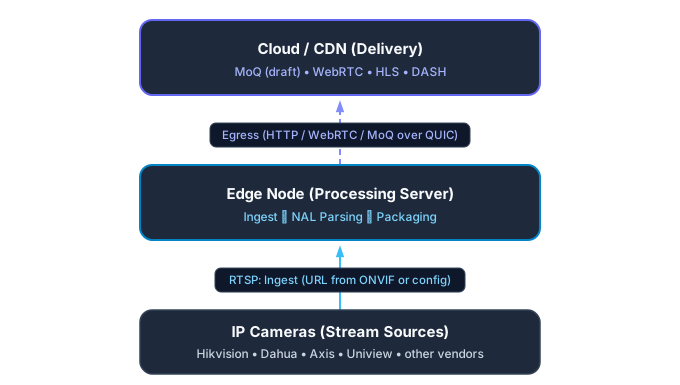
- ONVIF is a separate set of specifications (SOAP web services), not an “add-on over RTSP”. It is responsible for device discovery (
WS-Discovery), configuration, PTZ and events, and for the video itself it returns an RTSP link (GetStreamUri) and describes RTSP/RTP extensions. More in the ONVIF article. - WebRTC, HLS, DASH, MoQ are protocols for delivering media from a server to a viewer (to a browser or an application). They begin where RTSP has finished its work. MoQ, meanwhile, remains an IETF draft.
- FFmpeg and GStreamer are libraries and frameworks that hide the RTSP handshake. They are convenient for a prototype, while in production it is important to control reconnects, keep-alive and the quirks of specific cameras yourself.
Key takeaways
- RTSP is a control protocol. It is responsible for session commands, while the video travels over RTP.
- At least four steps before the first frame. The cycle
OPTIONS→DESCRIBE→SETUP(per track) →PLAY.OPTIONSis optional, authentication adds a round, and afterPLAYyou must wait for an IDR frame. For the two-track example this is 6–7 RTT including the TCP connection. - The transport is determined by the task. Start with TCP Interleaved, and move to UDP based on measurements in a stable LAN.
- SDP is an expectation, not a guarantee. Check it against the real RTP stream.
- Keep-alive is mandatory. Signs of life are the client’s RTSP requests and RTCP reports, not incoming RTP. Check whether your library does this in your transport mode.
- TEARDOWN is needed. The session is not tied to the TCP connection, and “dangling” sessions can occupy the camera’s slots.
- Do not take rumors for facts. Everything I marked as “verify” is worth reproducing on your own hardware.
Sources
Standards and specifications
- RFC 2326: Real Time Streaming Protocol (RTSP), April 1998.
- RFC 7826: RTSP 2.0, December 2016.
- RFC 3550: RTP and RFC 1889.
- RFC 3551: RTP A/V Profile, RFC 6184: H.264 over RTP, RFC 7798: H.265 over RTP, RFC 3640: MPEG-4 over RTP.
- RFC 2617 and RFC 7616: HTTP authentication (Basic, Digest).
- ONVIF Streaming Specification v19.06.
- Internet-Draft: Media over QUIC Transport (draft).
Source code
History and market
- History of the streaming media industry (Streaming Media Blog).
- AppleInsider: HTTP Live Streaming in iPhone 3.0 (2009).
- Apple WWDC19, session 502: Low-Latency HLS and HLS timeline.
- IHS Markit via Security Today: 1 billion cameras.
- Mordor Intelligence: surveillance camera market (secondary).
Practice (forums and project documentation, not primary sources)