Introduction
In the article about RTSP I described the protocol that delivers video from a camera to a client. RTSP has a clear job and clear boundaries: you already have an address like rtsp://…, and from there it is DESCRIBE, SETUP, PLAY and an RTP stream.
But that address has to come from somewhere. How do you find a camera on the network? What streams does it have, and how does the main one differ from the secondary one? How do you learn the path and port of the stream you need, when every manufacturer has its own? How do you get through authentication without guessing the scheme? RTSP does not answer these questions: it begins where they are already closed.
ONVIF closes them. In the RTSP article I called it a superstructure that takes over camera discovery and authentication. That is true, but incomplete: ONVIF is a whole set of web services. Through it you can discover devices, read and change settings, control pan-tilt-zoom optics (PTZ), receive events (motion, tampering, alarm input triggers), and work with recording on the camera itself. What it does not do is carry video: for that, ONVIF hands you a link to that same RTSP.
Analogy. If RTSP is a telephone line over which you can talk, then ONVIF is the phone book, the reception desk and the rules of polite address: it will tell you whom to dial, how to introduce yourself and which extension corresponds to the department you need. The conversation itself is no longer its business.
According to ONVIF, as of early 2026 there are more than 35,000 products that have passed conformance worldwide, and about 500 member companies. This is no guarantee that any camera will work with any client on the first try — there will be much below about where the “standard” diverges from reality — but it explains why today it is almost impossible to build a system that works with more than one brand of camera without ONVIF.
How to read the examples. All requests and responses in the article are composed from the official ONVIF schemas (WSDL/XSD, version 26.06) and the text of the specifications. The Media and Media2 requests and responses were additionally checked against these schemas automatically (the Device responses were composed from the type descriptions but were not validated separately). But these are not traces from a specific camera: real devices respond with variations — different namespace prefixes, a different order of auxiliary fields, extra extensions. Places I did not verify on live hardware are marked with the word “verify”. The full list is at the end.
History: why a common language was needed
The world before ONVIF
This is a well-known picture of the industry rather than a quote from a single source, so I will phrase it carefully. Before a common standard appeared, almost every IP camera manufacturer had its own HTTP API and its own SDK. A video surveillance system that wanted to work with cameras of several brands wrote a separate driver for each. The cost of integration grew with the number of manufacturers, and a camera manufacturer had no way into someone else’s system other than negotiating an integration by hand.
The more cameras and manufacturers there were, the less sustainable such a scheme looked.
2008: three companies
ONVIF was founded in 2008 by Axis Communications, Bosch Security Systems and Sony. The organization was registered on November 25, 2008 as a nonprofit corporation in the state of Delaware (501(c)(6)). The name originally stood for Open Network Video Interface Forum; when the scope of interest went beyond video (for example, into access control), the long name was dropped and only the abbreviation remained.
Importantly, from the very beginning the standard was conceived as an interface, not a video format: an agreement on how a client finds a device, asks about its capabilities and requests a stream. The codecs, formats and transmission protocols were already existing ones — RTP/RTSP, H.264 and so on.
Was there a competitor
At about the same time — according to open sources, in August 2008 — another initiative appeared, PSIA (Physical Security Interoperability Alliance), with a similar goal and a different technical approach. The sources here are mostly forums and industry blogs, so I will limit myself to a cautious conclusion: PSIA was supported by individual manufacturers, but it apparently did not gain wide adoption, and today it is ONVIF that has become the commonly accepted language.
From paper to a working standard
A specification without verification remains paper. So more important than the very first version was the sequence of steps that made the standard verifiable:
| Date | Event |
|---|---|
| November 2008 | Core Specification 1.0 |
| December 2008 | Test Specification 1.0 |
| May 2009 | Test tool and the conformance process |
| July 2009 | The first devices to pass conformance |
| October 2009 | 100 members |
| January 2011 | about 600 conformant products |
| 2018 / 2021 | 10,000 / 20,000 products |
| Early 2026 | more than 35,000 products |
The key word here is conformance: a device does not just claim “I support ONVIF”, it passes verification with a test tool, and the result is published. The current and most reliable source for checking a specific model is the official list of conformant products. Conformance, however, does not remove the need to test on your own bench: the test checks the declared functions, not all combinations of settings of a real firmware.
Profiles: how the standard learned to say “I promise”
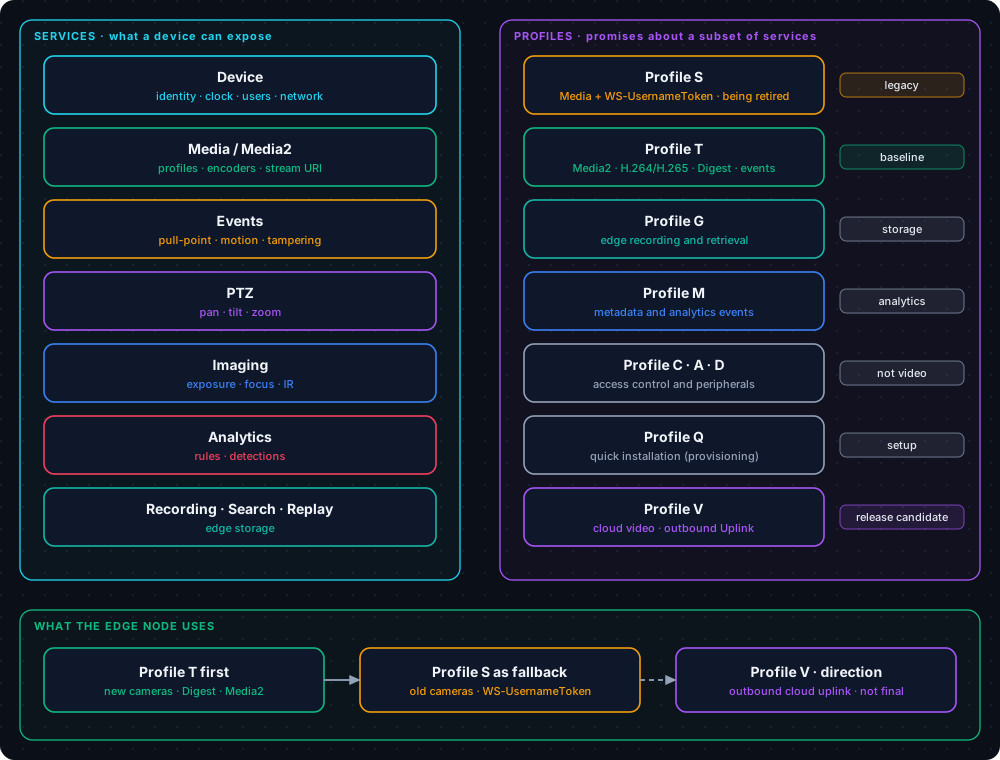
The Core Specification describes a great many capabilities, and no camera implements them all. If the standard demanded “support everything”, nobody would support it. If it demanded “support whatever you like”, a client could assume nothing. The solution was Profiles: named sets of mandatory features. A profile is a promise: “a device with this profile can do this.”
| Profile | Introduced | What the promise is about |
|---|---|---|
| Profile S | January 2012 | Video streaming: media profiles, obtaining an RTSP link, basic control |
| Profile C | March 2014 | Access control (doors, locks) |
| Profile G | June 2014 | Recording and playback on the device itself |
| Profile Q | December 2014 | Quick installation: discovery and initial configuration |
| Profile A | July 2017 | Access control configuration |
| Profile T | October 2018 | Modern video streaming: Media2, H.265, Digest, events, metadata |
| Profile M | June 2021 | Metadata and analytics events |
| Profile D | July 2021 | Access control peripherals |
| Profile V | July 2026 (Release Candidate) | Cloud video — see the last section |
For video surveillance three matter in practice: S (the foundation for many years), T (its successor) and G (recording to the camera’s memory card). The other profiles concern a different part of the world: doors, locks, readers.
It is worth remembering separately that a profile has two sides — the device and the client. “The camera conforms to Profile T” and “the VMS conforms to Profile T” are two different promises that are verified separately. The first does not imply the second.
Why SOAP
ONVIF is built on SOAP — XML over HTTP, with the interface described in WSDL. Today this looks archaic: verbose envelopes, namespaces, clients that you have to write on the fly. Yet for 2008 the choice does not look accidental. The motives of the standard’s authors are nowhere stated in a single phrase, so what follows is my reconstruction, not a quote.
At that time a whole set of WS-* (Web Services) specifications had formed in the enterprise world, and ONVIF invented almost nothing anew — it assembled ready-made building blocks:
| Task | What was taken | Where it shows up |
|---|---|---|
| Finding devices on the network | WS-Discovery (UDP multicast) | Probe / ProbeMatch / Hello / Bye |
| Interface description | WSDL + XSD | A machine-readable contract for every service |
| Authentication | WS-Security, UsernameToken | The wsse:Security header in a request |
| Events | WS-BaseNotification + WS-Topics | Subscriptions, PullPoint, topics like tns1:… |
The main advantage of this choice is a typed contract. WSDL and XSD describe every operation, every field, the allowed values. From them you can generate client code (some libraries do this) and automatically validate a request — which is exactly how the examples in this article were checked.
The price is paid in volume, complexity, and the fact that implementations “diverge slightly” in the details of XML. In addition, the specification has lived for ten years and remains backward compatible — sometimes at the expense of tidiness. An illustrative example: the schema still contains the value MPV4-ES, and a comment states outright that MP4V-ES was actually meant, but the error in the name was left for backward compatibility.
The structure of ONVIF
Services
A camera with ONVIF is not one “API” but a set of services, each of which has its own address (XAddr) and its own namespace:
| Service | What it provides | Why our node needs it |
|---|---|---|
| Device | Identification, time, users, network, a list of the other services | Entry point and clock check |
| Media (ver10) | Profiles, codecs, GetStreamUri in the “old” style | The main path for Profile S cameras |
| Media2 (ver20) | The same in a new edition, with H.265 | The main path for Profile T cameras |
| Events | Subscriptions and events: motion, tampering, inputs | A cheap trigger instead of image analysis |
| PTZ | Pan, tilt, zoom, presets | Only if a PTZ camera is needed |
| Imaging | Exposure, focus, IR illumination | Usually not needed |
| Analytics | Rules and detectors on the camera side | A source of metadata (Profile M) |
| Recording / Search / Replay | Recording on the camera itself | A fallback source when connectivity is lost (Profile G) |
The namespaces of the main services (from the ONVIF schemas):
| Prefix | Namespace |
|---|---|
tds | http://www.onvif.org/ver10/device/wsdl |
trt | http://www.onvif.org/ver10/media/wsdl |
tr2 | http://www.onvif.org/ver20/media/wsdl |
tt | http://www.onvif.org/ver10/schema |
Service addresses are not fixed. The developer guide (ONVIF Application Programmer’s Guide) explicitly warns: they depend on the manufacturer and the device, so they must be obtained dynamically. The popular path /onvif/device_service appears in the ProbeMatch of many cameras, but it is a convention, not a requirement.
Media and Media2: two generations of one service
We ended up with two media services not because someone lacked imagination. The first, Media (ver10), appeared together with Profile S. The second, Media2 (ver20), came together with Profile T. The differences visible in the schemas:
- H.265. In the
VideoEncodingenumeration that Media relies on, there are onlyJPEG,MPEG4andH264. H.265 appears only in Media2 (there the codec is passed as an IANA media subtype:H264,H265). - Requesting a link. In Media the client describes the stream with a
StreamSetupstructure (stream type and transport). In Media2 aProtocolstring is enough. - Secure transport. Among the capabilities of Media2 are RTSPS/SRTP and RTSP over WebSocket (
RTSPWebSocketUri). The current Media (ver10) schema has no such capabilities.
For a client the conclusion is simple: first check whether the camera has Media2, and if it does, work through it; otherwise fall back to Media.
What Profile T promises
Here only what was found in the text of Profile T v1.0 is given, with no additions “from memory”:
- The device must authenticate HTTP and RTSP requests using Digest.
- The device must support
GetServices,GetSystemDateAndTime,SetSystemDateAndTime,GetProfiles,GetStreamUri(via Media2) andSetSynchronizationPoint(a request for an out-of-order keyframe). - At least one of the H.264 or H.265 codecs is mandatory; which one is up to the manufacturer.
- Streaming over RTP/UDP, RTP/RTSP/HTTP/TCP and RTP/UDP multicast is mandatory. HTTPS and WebSocket are conditional, that is, not for everyone.
- Metadata streaming, OSD, motion events (Motion Alarm) and at least one type of tampering event (Tampering) are mandatory.
- The device must allow at least two PullPoint-type subscriptions (
MaxPullPoints). - A Profile T client must discover services through
GetServices, not through the deprecatedGetCapabilities.
There is an unexpected nuance here: HTTPS is optional in Profile T. If you are counting on channel encryption, you will have to verify this separately (in 2024 ONVIF released the TLS Configuration Add-on, but that is a separate document, not part of Profile T).
How a client finds a camera and requests a stream
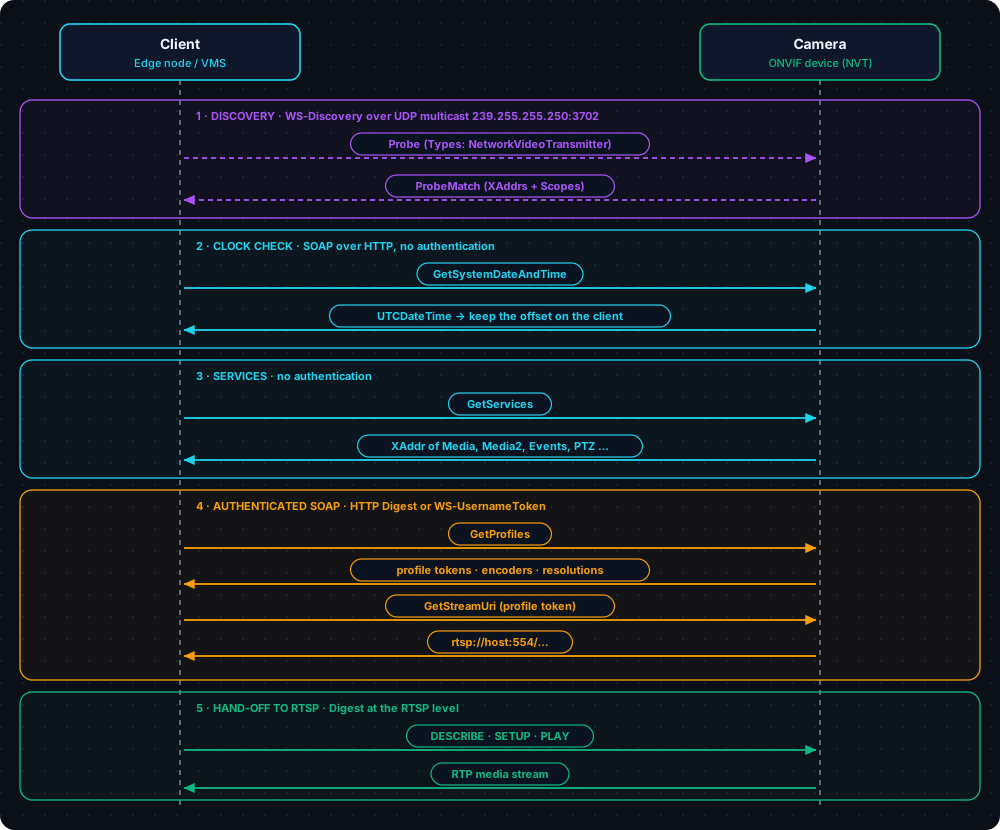
The most useful part for practice is the sequence. It barely changes from camera to camera, and if you implement it carefully, the rest is a matter of details.
Step 1. Discovery: WS-Discovery
The client sends a Probe — a SOAP message over UDP to the multicast address 239.255.255.250, port 3702 (for IPv6, ff02::c). Any device that is listening and matches the query replies with a ProbeMatch directly to the client.
<e:Envelope xmlns:e="http://www.w3.org/2003/05/soap-envelope"
            xmlns:w="http://schemas.xmlsoap.org/ws/2004/08/addressing"
            xmlns:d="http://schemas.xmlsoap.org/ws/2005/04/discovery"
            xmlns:dn="http://www.onvif.org/ver10/network/wsdl">
  <e:Header>
    <w:MessageID>uuid:84ede3de-7dec-11d0-c360-f01234567890</w:MessageID>
    <w:To e:mustUnderstand="true">urn:schemas-xmlsoap-org:ws:2005:04:discovery</w:To>
    <w:Action e:mustUnderstand="true">http://schemas.xmlsoap.org/ws/2005/04/discovery/Probe</w:Action>
  </e:Header>
  <e:Body>
    <d:Probe>
      <d:Types>dn:NetworkVideoTransmitter</d:Types>
    </d:Probe>
  </e:Body>
</e:Envelope>
The device replies like this:
<SOAP-ENV:Envelope xmlns:SOAP-ENV="http://www.w3.org/2003/05/soap-envelope"
                   xmlns:wsadis="http://schemas.xmlsoap.org/ws/2004/08/addressing"
                   xmlns:d="http://schemas.xmlsoap.org/ws/2005/04/discovery"
                   xmlns:dn="http://www.onvif.org/ver10/network/wsdl"
                   xmlns:tds="http://www.onvif.org/ver10/device/wsdl">
  <SOAP-ENV:Header>
    <wsadis:MessageID>uuid:1b2c3d4e-0000-4000-8000-0123456789ab</wsadis:MessageID>
    <wsadis:RelatesTo>uuid:84ede3de-7dec-11d0-c360-f01234567890</wsadis:RelatesTo>
    <wsadis:To>http://schemas.xmlsoap.org/ws/2004/08/addressing/role/anonymous</wsadis:To>
    <wsadis:Action>http://schemas.xmlsoap.org/ws/2005/04/discovery/ProbeMatches</wsadis:Action>
  </SOAP-ENV:Header>
  <SOAP-ENV:Body>
    <d:ProbeMatches>
      <d:ProbeMatch>
        <wsadis:EndpointReference>
          <wsadis:Address>urn:uuid:0f1e2d3c-0000-4000-8000-ba9876543210</wsadis:Address>
        </wsadis:EndpointReference>
        <d:Types>dn:NetworkVideoTransmitter tds:Device</d:Types>
        <d:Scopes>onvif://www.onvif.org/Profile/Streaming
                  onvif://www.onvif.org/Profile/T
                  onvif://www.onvif.org/name/Demo-Camera
                  onvif://www.onvif.org/hardware/DC-100</d:Scopes>
        <d:XAddrs>http://192.168.1.64/onvif/device_service</d:XAddrs>
        <d:MetadataVersion>1</d:MetadataVersion>
      </d:ProbeMatch>
    </d:ProbeMatches>
  </SOAP-ENV:Body>
</SOAP-ENV:Envelope>
What matters here:
XAddrs— the address of the Device service. The element may contain several addresses separated by spaces; the client should try them in turn and keep the one that actually responds.Scopes— labels of the formonvif://www.onvif.org/…: name, hardware model, location and, what we need, the supported profiles. A device conforming to Profile T must include the corresponding entry in the scope list. In the example above these areProfile/TandProfile/Streaming(this entry appears in an example in the Core Specification; it is worth associating it specifically with Profile S only after checking against the text of the profile).Types— according to the Core Specification a device must include thetds:Devicetype inTypes. Thedn:NetworkVideoTransmittertype is often used by clients; it is not mentioned in Core Specification 19.06. By WS-Discovery logic, a Probe withoutTypesmatches all devices, so for a broad search you can send exactly that — or specify both types.
By default a device is in discoverable mode, but the Core Specification also allows a non-discoverable mode, in which the camera does not listen to WS-Discovery at all. So “the camera was not found” does not mean “the camera has no ONVIF”.
One more detail that explains many mysterious “silences”: according to the Core Specification, on an error in a multicast packet the device must silently discard it rather than reply with an error — so that many cameras do not flood the network with replies. So a Probe that is formatted non-standardly gets nothing: neither a refusal nor a hint. In the community there are complaints that some cameras do not tolerate non-standard namespace prefixes; it is worth checking this on your own models.
Step 2. The clock: GetSystemDateAndTime
The first call after discovery is not GetProfiles but GetSystemDateAndTime. It has two roles: it checks that the address from XAddrs is reachable at all, and it reports the camera’s time. According to the Core Specification, this is a PRE_AUTH class call: no password is needed.
<s:Envelope xmlns:s="http://www.w3.org/2003/05/soap-envelope"
            xmlns:tds="http://www.onvif.org/ver10/device/wsdl">
  <s:Body>
    <tds:GetSystemDateAndTime/>
  </s:Body>
</s:Envelope><s:Envelope xmlns:s="http://www.w3.org/2003/05/soap-envelope"
xmlns:tds="http://www.onvif.org/ver10/device/wsdl"
xmlns:tt="http://www.onvif.org/ver10/schema">
<s:Body>
<tds:GetSystemDateAndTimeResponse>
<tds:SystemDateAndTime>
<tt:DateTimeType>NTP</tt:DateTimeType>
<tt:DaylightSavings>false</tt:DaylightSavings>
<tt:TimeZone>
<tt:TZ>CST-8</tt:TZ>
</tt:TimeZone>
<tt:UTCDateTime>
<tt:Time><tt:Hour>8</tt:Hour><tt:Minute>15</tt:Minute><tt:Second>27</tt:Second></tt:Time>
<tt:Date><tt:Year>2026</tt:Year><tt:Month>10</tt:Month><tt:Day>4</tt:Day></tt:Date>
</tt:UTCDateTime>
<tt:LocalDateTime>
<tt:Time><tt:Hour>16</tt:Hour><tt:Minute>15</tt:Minute><tt:Second>27</tt:Second></tt:Time>
<tt:Date><tt:Year>2026</tt:Year><tt:Month>10</tt:Month><tt:Day>4</tt:Day></tt:Date>
</tt:LocalDateTime>
</tds:SystemDateAndTime>
</tds:GetSystemDateAndTimeResponse>
</s:Body>
</s:Envelope>Why this is needed is explained below, in the section on authentication. For now, the main thing: this is the very call with which you should begin talking to any camera, especially an unfamiliar one.
Step 3. Services: GetServices
Now you can ask what the camera can do and at which addresses. GetServices is also PRE_AUTH. There is also a deprecated GetCapabilities with the same function; in the WSDL it is marked as replaced by GetServices, and Profile T requires specifically GetServices from the client.
<s:Envelope xmlns:s="http://www.w3.org/2003/05/soap-envelope"
            xmlns:tds="http://www.onvif.org/ver10/device/wsdl">
  <s:Body>
    <tds:GetServices>
      <tds:IncludeCapability>false</tds:IncludeCapability>
    </tds:GetServices>
  </s:Body>
</s:Envelope><s:Envelope xmlns:s="http://www.w3.org/2003/05/soap-envelope"
xmlns:tds="http://www.onvif.org/ver10/device/wsdl"
xmlns:tt="http://www.onvif.org/ver10/schema">
<s:Body>
<tds:GetServicesResponse>
<tds:Service>
<tds:Namespace>http://www.onvif.org/ver10/device/wsdl</tds:Namespace>
<tds:XAddr>http://192.168.1.64/onvif/device_service</tds:XAddr>
<tds:Version><tt:Major>2</tt:Major><tt:Minor>60</tt:Minor></tds:Version>
</tds:Service>
<tds:Service>
<tds:Namespace>http://www.onvif.org/ver10/media/wsdl</tds:Namespace>
<tds:XAddr>http://192.168.1.64/onvif/media_service</tds:XAddr>
<tds:Version><tt:Major>2</tt:Major><tt:Minor>60</tt:Minor></tds:Version>
</tds:Service>
<tds:Service>
<tds:Namespace>http://www.onvif.org/ver20/media/wsdl</tds:Namespace>
<tds:XAddr>http://192.168.1.64/onvif/media2_service</tds:XAddr>
<tds:Version><tt:Major>2</tt:Major><tt:Minor>60</tt:Minor></tds:Version>
</tds:Service>
</tds:GetServicesResponse>
</s:Body>
</s:Envelope>By Namespace you can tell which services are present. The presence of http://www.onvif.org/ver20/media/wsdl means Media2.
Step 4. Media profiles: GetProfiles
A Media Profile is a set of configurations bound to one another: a video source, a video encoder and, where needed, audio, PTZ and metadata. A camera usually contains several ready-made profiles: one for the main stream, one for the secondary stream.
From this step on, authentication is needed (more on it below). The header with the signature (its format is covered in more detail in the section on authentication) is added to s:Header:
<s:Header>
  <wsse:Security xmlns:wsse="http://docs.oasis-open.org/wss/2004/01/oasis-200401-wss-wssecurity-secext-1.0.xsd"
                 xmlns:wsu="http://docs.oasis-open.org/wss/2004/01/oasis-200401-wss-wssecurity-utility-1.0.xsd">
    <wsse:UsernameToken>
      <wsse:Username>admin</wsse:Username>
      <wsse:Password Type="http://docs.oasis-open.org/wss/2004/01/oasis-200401-wss-username-token-profile-1.0#PasswordDigest">O7QloJhZpZwZB0wE/cDlHXB6L3g=</wsse:Password>
      <wsse:Nonce EncodingType="http://docs.oasis-open.org/wss/2004/01/oasis-200401-wss-soap-message-security-1.0#Base64Binary">LKqI6G/AikKCQrN0zqZFlg==</wsse:Nonce>
      <wsu:Created>2026-10-04T08:15:30Z</wsu:Created>
    </wsse:UsernameToken>
  </wsse:Security>
</s:Header>
And the request itself looks like this:
<s:Envelope xmlns:s="http://www.w3.org/2003/05/soap-envelope"
            xmlns:tr2="http://www.onvif.org/ver20/media/wsdl">
  <s:Body>
    <tr2:GetProfiles>
      <tr2:Type>All</tr2:Type>
    </tr2:GetProfiles>
  </s:Body>
</s:Envelope><s:Envelope xmlns:s="http://www.w3.org/2003/05/soap-envelope"
xmlns:tr2="http://www.onvif.org/ver20/media/wsdl"
xmlns:tt="http://www.onvif.org/ver10/schema">
<s:Body>
<tr2:GetProfilesResponse>
<tr2:Profiles token="profile_main" fixed="true">
<tr2:Name>mainStream</tr2:Name>
<tr2:Configurations>
<tr2:VideoSource token="vsc_1">
<tt:Name>VideoSourceConfig</tt:Name>
<tt:UseCount>2</tt:UseCount>
<tt:SourceToken>vs_1</tt:SourceToken>
<tt:Bounds x="0" y="0" width="2560" height="1440"/>
</tr2:VideoSource>
<tr2:VideoEncoder token="venc_main" GovLength="50" Profile="Main">
<tt:Name>VideoEncoder_Main</tt:Name>
<tt:UseCount>1</tt:UseCount>
<tt:Encoding>H265</tt:Encoding>
<tt:Resolution><tt:Width>2560</tt:Width><tt:Height>1440</tt:Height></tt:Resolution>
<tt:RateControl ConstantBitRate="false">
<tt:FrameRateLimit>25</tt:FrameRateLimit>
<tt:BitrateLimit>4096</tt:BitrateLimit>
</tt:RateControl>
<tt:Quality>5</tt:Quality>
</tr2:VideoEncoder>
</tr2:Configurations>
</tr2:Profiles>
<tr2:Profiles token="profile_sub" fixed="true">
<tr2:Name>subStream</tr2:Name>
<tr2:Configurations>
<tr2:VideoSource token="vsc_1">
<tt:Name>VideoSourceConfig</tt:Name>
<tt:UseCount>2</tt:UseCount>
<tt:SourceToken>vs_1</tt:SourceToken>
<tt:Bounds x="0" y="0" width="2560" height="1440"/>
</tr2:VideoSource>
<tr2:VideoEncoder token="venc_sub" GovLength="25" Profile="Main">
<tt:Name>VideoEncoder_Sub</tt:Name>
<tt:UseCount>1</tt:UseCount>
<tt:Encoding>H264</tt:Encoding>
<tt:Resolution><tt:Width>640</tt:Width><tt:Height>360</tt:Height></tt:Resolution>
<tt:RateControl ConstantBitRate="false">
<tt:FrameRateLimit>10</tt:FrameRateLimit>
<tt:BitrateLimit>512</tt:BitrateLimit>
</tt:RateControl>
<tt:Quality>3</tt:Quality>
</tr2:VideoEncoder>
</tr2:Configurations>
</tr2:Profiles>
</tr2:GetProfilesResponse>
</s:Body>
</s:Envelope>What is worth noting:
- The profile name (
mainStream,subStream) is an arbitrary manufacturer label. Choose a stream not by name but by the encoder parameters:Encoding,Resolution,FrameRateLimit,BitrateLimit. The token (token) is the identifier that is passed on. - The
GovLengthattribute is the length of a group of pictures. According to the description in the schema, it determines how often reference (I) frames occur in the stream. For us this matters practically: it is what determines how long you wait for the first picture after connecting. Profile T hasSetSynchronizationPointfor this, but the real delay must be checked on specific cameras — verify. fixed="true"means the profile cannot be deleted.
Step 5. The stream address: GetStreamUri
Finally, what it was all for. The request in Media2:
<s:Envelope xmlns:s="http://www.w3.org/2003/05/soap-envelope"
            xmlns:tr2="http://www.onvif.org/ver20/media/wsdl">
  <s:Body>
    <tr2:GetStreamUri>
      <tr2:Protocol>RTSP</tr2:Protocol>
      <tr2:ProfileToken>profile_main</tr2:ProfileToken>
    </tr2:GetStreamUri>
  </s:Body>
</s:Envelope><s:Envelope xmlns:s="http://www.w3.org/2003/05/soap-envelope"
xmlns:tr2="http://www.onvif.org/ver20/media/wsdl">
<s:Body>
<tr2:GetStreamUriResponse>
<tr2:Uri>rtsp://192.168.1.64:554/stream1</tr2:Uri>
</tr2:GetStreamUriResponse>
</s:Body>
</s:Envelope>The value RTSP in Protocol means RTP over TCP (that is, interleaved frames inside the RTSP connection), not “just RTSP”. The other Media2 values are: RtspUnicast (RTP/UDP), RtspMulticast, RtspsUnicast, RtspsMulticast (SRTP) and RtspOverHttp (tunneling).
In Media (ver10) the same request looks different:
<s:Envelope xmlns:s="http://www.w3.org/2003/05/soap-envelope"
            xmlns:trt="http://www.onvif.org/ver10/media/wsdl"
            xmlns:tt="http://www.onvif.org/ver10/schema">
  <s:Body>
    <trt:GetStreamUri>
      <trt:StreamSetup>
        <tt:Stream>RTP-Unicast</tt:Stream>
        <tt:Transport>
          <tt:Protocol>RTSP</tt:Protocol>
        </tt:Transport>
      </trt:StreamSetup>
      <trt:ProfileToken>profile_main</trt:ProfileToken>
    </trt:GetStreamUri>
  </s:Body>
</s:Envelope><s:Envelope xmlns:s="http://www.w3.org/2003/05/soap-envelope"
xmlns:trt="http://www.onvif.org/ver10/media/wsdl"
xmlns:tt="http://www.onvif.org/ver10/schema">
<s:Body>
<trt:GetStreamUriResponse>
<trt:MediaUri>
<tt:Uri>rtsp://192.168.1.64:554/stream1</tt:Uri>
<tt:InvalidAfterConnect>false</tt:InvalidAfterConnect>
<tt:InvalidAfterReboot>false</tt:InvalidAfterReboot>
<tt:Timeout>PT0S</tt:Timeout>
</trt:MediaUri>
</trt:GetStreamUriResponse>
</s:Body>
</s:Envelope>Two details that are easy to miss:
- The Media response contains the fields
InvalidAfterConnect=false,InvalidAfterReboot=falseandTimeout=PT0S: by the specification the link is valid indefinitely, even if the profile has changed. It can be saved rather than requested on every start. - In the operation description in the Media WSDL the stream type value is written as
RTP_unicast, whereas the enumeration in the XSD allowsRTP-Unicast. This is a discrepancy within the documents themselves; in a request it is worth using the value from the XSD — that is what the schema validation is based on.
From here begins the territory of the article about RTSP: DESCRIBE, SETUP, PLAY, with Digest now at the RTSP level. ONVIF has done its part — it has returned the address.
Authentication: the most painful part
Two methods, one user
According to the Core Specification, all ONVIF services must be protected by HTTP Digest (RFC 2617), with two exceptions: “legacy” devices that support WS-UsernameToken, and TLS client authentication. If a device supports both methods, a client may use either: at the HTTP level (Digest) or at the SOAP level (the wsse:Security header). The users are shared.
| Method | Where it lives | What to know |
|---|---|---|
| HTTP Digest | HTTP headers | Mandatory for Profile T; the Core Specification refers to RFC 2617, where the base algorithm is MD5 |
| WS-UsernameToken | SOAP header | Mandatory for Profile S devices; requires accurate time and a nonce |
| TLS | Transport | Recommended by the Core Specification; conditional in Profile T |
Profile S, per its text (v1.1.1), requires WS-UsernameToken from the device, while HTTP Digest is an optional feature for the device, and the client must be able to do both. The information about the text of Profile S was taken from a secondary copy of the document, so the wording is worth rechecking on onvif.org. The practical conclusion for a client: support both methods, otherwise some old cameras will be inaccessible.
The specification itself assesses the protection quite bluntly: both Digest and UsernameToken give only a “rudimentary level of security”, and where security matters, it recommends configuring access over TLS. My conclusion for design: camera authentication protects against mistakes and accidental connections, but not against an attacker already on the same network as the camera. So cameras are best kept in a separate VLAN — that is a conversation of its own, and it is connected with the Edge node architecture.
How to tell one method from the other by the response
The Core Specification describes behavior by which you can determine which authentication the device expects:
- If the device supports Digest and the client sent no credentials, it returns HTTP 401 — the client understands that Digest is needed.
- If the device supports only UsernameToken, the response is different: HTTP 400 and a SOAP fault
ter:NotAuthorizedwith the codes:Sender.
<s:Envelope xmlns:s="http://www.w3.org/2003/05/soap-envelope"
            xmlns:ter="http://www.onvif.org/ver10/error">
  <s:Body>
    <s:Fault>
      <s:Code>
        <s:Value>s:Sender</s:Value>
        <s:Subcode>
          <s:Value>ter:NotAuthorized</s:Value>
        </s:Subcode>
      </s:Code>
      <s:Reason>
        <s:Text xml:lang="en">Sender not authorized</s:Text>
      </s:Reason>
    </s:Fault>
  </s:Body>
</s:Envelope>
A client must not send HTTP Digest and WS-UsernameToken at the same time: the device will first check the HTTP level and then the SOAP level. If you mix both, an error in either will lead to a refusal.
The UsernameToken signature: the formula and the time
The password is not sent in SOAP: a digest goes in its place:
PasswordDigest = Base64( SHA1( Nonce + Created + Password ) )Here Nonce is random bytes that the client generates anew for each request (in XML they are encoded in Base64, while the hash takes the raw bytes), Created is the request time in UTC, and Password is the password. The Core Specification requires the client to use both a nonce and a timestamp; the server must reject a token that lacks either of them.
Because of Created, the main practical problem arises. The camera compares the time in the request with its own, and if the discrepancy is larger than the tolerance, the request is rejected. The tolerance is not set by the standard; in developers’ answers a value of about 5 seconds is found for Axis, and the ONVIF developer guide uses the same “five-second” caveat in its examples. The clock of a camera that has not gone to an NTP server drifts quickly.
The guide proposes a neat solution that changes the client, not the camera:
- Call
GetSystemDateAndTime(without authentication). - Compute the difference between the camera’s time and your own.
- Store this difference as a correction for this camera and substitute it into
Created.
There is no need to change the camera’s clock just so that you can talk to it. A minimal example in Python (standard library, no third-party packages):
import base64, hashlib, os, re
from datetime import datetime, timedelta, timezone
from urllib.request import Request, urlopen

SOAP = "http://www.w3.org/2003/05/soap-envelope"

def envelope(body, header=""):
    return (f'<s:Envelope xmlns:s="{SOAP}"><s:Header>{header}</s:Header>'
            f'<s:Body>{body}</s:Body></s:Envelope>')

def device_time_offset(xaddr):
    """GetSystemDateAndTime needs no authentication: ask the camera what time it is."""
    body = '<tds:GetSystemDateAndTime xmlns:tds="http://www.onvif.org/ver10/device/wsdl"/>'
    req = Request(xaddr, envelope(body).encode(),
                  {"Content-Type": "application/soap+xml; charset=utf-8"})
    xml = urlopen(req, timeout=5).read().decode()
    utc = re.search(r"<(?:\w+:)?UTCDateTime>(.*?)</(?:\w+:)?UTCDateTime>", xml, re.S).group(1)
    g = lambda tag: int(re.search(rf"<(?:\w+:)?{tag}>(\d+)<", utc).group(1))
    cam = datetime(g("Year"), g("Month"), g("Day"), g("Hour"), g("Minute"), g("Second"),
                   tzinfo=timezone.utc)
    return cam - datetime.now(timezone.utc)          # remember it; do NOT touch the camera clock

def username_token(user, password, offset=timedelta(0)):
    nonce = os.urandom(16)
    created = (datetime.now(timezone.utc) + offset).strftime("%Y-%m-%dT%H:%M:%SZ")
    digest = base64.b64encode(
        hashlib.sha1(nonce + created.encode() + password.encode()).digest()).decode()
    return (
        '<wsse:Security xmlns:wsse="http://docs.oasis-open.org/wss/2004/01/oasis-200401-wss-wssecurity-secext-1.0.xsd" '
        'xmlns:wsu="http://docs.oasis-open.org/wss/2004/01/oasis-200401-wss-wssecurity-utility-1.0.xsd">'
        f"<wsse:UsernameToken><wsse:Username>{user}</wsse:Username>"
        '<wsse:Password Type="http://docs.oasis-open.org/wss/2004/01/oasis-200401-wss-username-token-profile-1.0#PasswordDigest">'
        f"{digest}</wsse:Password>"
        '<wsse:Nonce EncodingType="http://docs.oasis-open.org/wss/2004/01/oasis-200401-wss-soap-message-security-1.0#Base64Binary">'
        f"{base64.b64encode(nonce).decode()}</wsse:Nonce>"
        f"<wsu:Created>{created}</wsu:Created></wsse:UsernameToken></wsse:Security>"
    )
The code was tested against a local “camera mock” that checks the digest and rejects a request if the clocks differ by more than 5 seconds: without the correction, with a 17-minute difference, HTTP 400 comes back, and with the correction the request passes. The digest formula was additionally cross-checked against an independent implementation (the zeep library). This is a check of the logic, not a guarantee that it works with any real camera.
Cameras in practice: where the standard ends
Below are typical problems. Only those problems for which there is a source are left here; the rest are honestly marked as needing verification.
Problem 1: the camera’s clock
A camera without NTP and with a drifted clock does not accept UsernameToken, replying with an unclear authentication error. In Digital Watchdog’s instructions for Hikvision cameras it is stated that a discrepancy of more than 10 minutes can break authentication.
Recommendation. Always start with GetSystemDateAndTime, store the correction and log it. If the correction is large, it is a signal to the operator that “the camera has no NTP”, not a reason to quietly rewrite its clock.
Problem 2: ONVIF is off by default
According to the same instructions, in Hikvision firmware starting with version 5.5.0 ONVIF is disabled by default, and the authentication mode is called “Digest & ws-username token”. It has to be enabled manually, and this must be done before you start considering the camera “unsupported”.
The same instructions warn about lockout: repeated wrong login attempts can lock the camera for 30 minutes (“Illegal Login Lock”).
Recommendation. Distinguish “not found” (no response to Probe), “ONVIF is off” (the port does not respond or there is no service) and “failed to authenticate” (401/400). After two or three failures, pause and notify the operator rather than looping on retries endlessly: it may lock the camera for half an hour.
Problem 3: two different authentication errors
As shown above, 401 means “Digest is needed”, while 400 with NotAuthorized means “UsernameToken was expected”. Not all clients tell them apart, and in the logs it just looks like “an error”.
Recommendation. Parse the response, not just the code: determine the authentication method from the first response and remember it for this camera. Use one method at a time.
Problem 4: the address in the response is wrong
According to the GetServices description in the WSDL, the scheme and the IP in XAddr must match those the request to the device was sent to. This means that a camera that returns an internal address instead of the one it was reached at (for example, because of NAT or port forwarding) violates the specification. For GetStreamUri there is no such direct requirement in the documents studied: it only says that the address is permanent and must not be longer than 128 octets. How often a “wrong IP” occurs in a stream link — verify.
Recommendation. Compare the host from the response with the one you connected to. If they differ, write it to the log. Substituting the host (keeping the path and port) is worth doing only as a separate, explicit decision verified on the specific camera.
Problem 5: the “main” and the “secondary” stream
Profile names are arbitrary, and the settings (codec, resolution, frame rate, GovLength) of the main and secondary streams differ. What differences real cameras actually have and how they affect first-frame latency has not been measured — verify.
Recommendation. Choose a profile by the encoder parameters. For event detection the secondary stream is often enough, and the main one is needed for recording. But make the decision based on measurements on your own cameras.
Problem 6: the camera is silent on Probe
Causes confirmed by documents: the device may be in non-discoverable mode; a non-standard Probe is silently discarded. Another one, which practitioners write about but which was not verified here: multicast discovery does not pass between subnets and VLANs without special configuration — verify on your own network.
Recommendation. Always keep a manual mode: if the operator has specified the camera’s IP, try GetSystemDateAndTime directly at http://<ip>/onvif/device_service, and if that fails, at the addresses from the manufacturer’s documentation. This is a convention, not a guarantee.
Problem 7: limits
There is one confirmed limit in Profile T: the device must allow at least two PullPoint subscriptions. More is up to the manufacturer, so you cannot count on many simultaneous event readers. For Media2 the device reports MaximumNumberOfProfiles. How many simultaneous RTSP connections a specific camera can handle, the standard does not define — verify on your own models.
Recommendation. One connection per stream, and then relaying inside the node. That way the camera does not depend on the number of consumers. This is consistent with the Edge node architecture, where a single component (CameraManager) reads the camera.
Where ONVIF is heading
The end of Profile S
In October 2025 ONVIF announced that it was ending support for Profile S and recommending Profile T. The reason is the outdated UsernameToken authentication model. According to industry blogs, new Profile S conformance applications are accepted until March 31, 2027; the exact dates are best checked on onvif.org. Installed cameras will keep working as they did, which means Profile S will remain in the installed base for years.
For a client this settles the question of priority: Profile T is the basis for new devices, Profile S is the fallback for old ones.
Profile V: the camera phones home
In July 2026 ONVIF announced the Release Candidate of Profile V — a profile for cloud video, which is due to be finally approved by the end of 2026. The main idea: the device itself establishes a secure outbound connection (Uplink) to a cloud system, and normally nothing needs to be forwarded through NAT or set up as a VPN. According to the announcement, live video and audio go over WebRTC, events are sent to the cloud, and encrypted recordings go to cloud storage; OAuth 2.0 is required for authorization.
The details (the Uplink specification version, WebSocket Secure, mutual TLS) were found only on a vendor’s blog and are considered a secondary source. The specification itself is currently available only to ONVIF members for review, so everything said above is a direction, not a fact. But the direction is a familiar one: the Edge node architecture is also built on an outbound connection with no inbound ports, and if Profile V is approved in the form under consideration, the two will be close in idea.
What this means for the Edge node
If we reduce everything said to decisions for the project:
- Profile T first, Profile S as the fallback. First
GetServices; if there is Media2, work through it; if not, through Media. - Start with
GetSystemDateAndTime. The time correction is stored together with the rest of the camera’s data. - Support both authentication methods and remember which one the camera needs.
- Do not hardcode service addresses. Save the
XAddrfromGetServices, and callGetStreamUrionce and save the link. - Motion and tampering events (mandatory in Profile T) are a cheap source of signals without video analysis.
- Profile V is not a pillar but a direction; the layer that works with the camera is worth separating from the rest so that a replacement does not require a rewrite.
What I have not yet verified on live cameras
This article relies on specifications, schemas and manufacturers’ documentation, but not on measurements. Here is what remains open:
- How often cameras return a wrong IP in
GetStreamUriandGetServices. - The differences between the main and secondary streams and the real first-frame latency at different
GovLengthvalues. - Whether WS-Discovery works between VLANs and what exactly must be configured for that.
- The time tolerance of specific models: 5 seconds is only one of the values encountered.
- How many simultaneous RTSP connections specific cameras can handle.
- Which XML prefixes and formats finicky implementations accept.
- The current wording of Profile S (a secondary copy was studied) and the exact dates of its retirement.
- Everything concerning Profile V: the profile has not yet been approved.
When results on real cameras appear, I will supplement the article with a compatibility table.
Key takeaways
- ONVIF answers the questions with which RTSP begins: where the camera is, what it can do, what the stream address is and how to authenticate. It does not carry video.
- The standard arose from an agreement of three companies in 2008 and became workable because tests and a conformance process appeared right alongside it.
- Profiles are promises. S is the past, T is the present, V is a possible future. The camera’s promise and the client’s promise are verified separately.
- The sequence is constant: Probe →
GetSystemDateAndTime→GetServices→GetProfiles→GetStreamUri→ RTSP. - Time decides everything. UsernameToken needs synchronized clocks; the neatest solution is not to change the camera but to store the correction on the client.
- Authentication is the most fragile part: two methods, two kinds of errors, lockouts after failed attempts. Tell them apart and do not retry blindly.
- Do not trust addresses from responses or profile names — check them and compare against what you know about the camera.
- Everything not verified on hardware must be marked. The standard describes an ideal camera, and real devices diverge from it in the details.
Sources
- ONVIF — Wikipedia: founding, version and profile dates.
- ONVIF: Building your security future (2026) and Mission: the number of products and members; the list of conformant products.
- ONVIF Core Specification v19.06: discovery, authentication, access classes; the WSDL/XSD schemas: Device, Media, Media2, onvif.xsd (version 26.06).
- ONVIF Profile T Specification v1.0.
- ONVIF Application Programmer’s Guide v1.0: the first actions after discovery, the time correction.
- OASIS WS-Security UsernameToken Profile 1.0.
- Security Systems News: ONVIF ending support for Profile S (2025-10-09) and on Profile V (2026-07-10).
- Digital Watchdog: Enabling ONVIF on Hikvision cameras.
- Secondary sources (blogs and forums; used with caution): information about PSIA, the time tolerance on Axis (Stack Overflow discussions), the Uplink details in Profile V (the Fora Soft blog).